Platform
WordPress plugin (6.5+)
The product installs as a standard WordPress plugin with a top-level Drive Backup admin screen, activation hooks that create its own database tables, and WP-Cron powering job execution and weekly schedules.
Beta version: still testing. Code is in private repository.
A WordPress plugin for full file and database backups to a plugin-created Google Drive folder, with one-click same-site restore. It is built in dependency-free PHP with a staged job engine, resumable Drive uploads, SHA-256 manifest verification, weekly scheduled backups with retention and email notifications, and database and file rollback.
Live at: private repository
What powers the backup plugin and how backup jobs move from the WordPress admin to Google Drive.
The product installs as a standard WordPress plugin with a top-level Drive Backup admin screen, activation hooks that create its own database tables, and WP-Cron powering job execution and weekly schedules.
Around 3,100 lines of PHP 7.2+ across ten focused classes, with polyfills for newer string helpers, no Composer packages, no Google SDK, and a vanilla JavaScript and CSS admin interface.
OAuth 2.0 with the narrow drive.file scope (the plugin can only see folders and files it creates itself), resumable uploads and downloads, and raw REST calls through the WordPress HTTP API.
Same-site restore guarded by administrator password confirmation and maintenance mode. Every artifact is downloaded and verified before anything changes, files are extracted into private staging, and database plus changed-file rollback data is created first.
Every backup artifact is hashed into a SHA-256 manifest and verified after upload and before restore. OAuth tokens and the client secret are encrypted with AES-256-GCM using keys derived from the WordPress salts.
The repository ships a project-local agent skill that validates restore integrity before changes are trusted: percent-sign round-trips, permalink structures, serialized PHP data, and Gutenberg column styles, checked with deterministic scan scripts.
Backups and restores are long-running jobs, so the plugin advances them one small stage at a time instead of one fragile request.
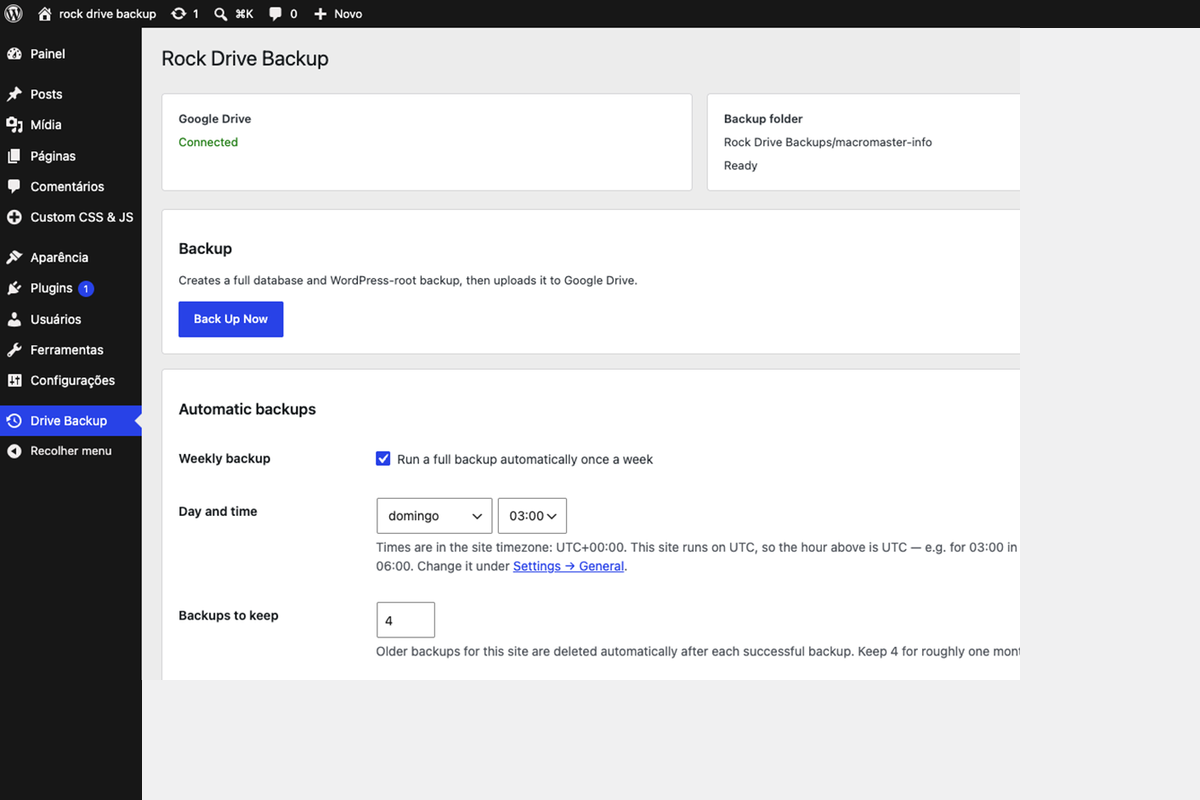
templates/admin-page.php holds the Google connection status, backup folder, Back Up Now button, weekly schedule settings, and the list of restorable backups.
class-rdb-repository.php creates each backup or restore as a row in a custom jobs table with a UUID, status, stage, and progress, alongside a logs table.
class-rdb-job-runner.php runs every minute via WP-Cron, acquires a lock, and advances the current job by exactly one stage, so long jobs survive PHP time limits and can resume.
class-rdb-backup-engine.php moves through preflight, database dump, file scan, multi-volume archiving, resumable upload, manifest build, and verification.
class-rdb-restore-engine.php downloads and verifies the manifest and artifacts, extracts into staging, snapshots the database and changed files for rollback, then copies files and imports the database.
The plugin is a small set of final classes wired together in one plugin class, with both engines built as step machines over a shared repository.
rock-drive-backup.php
uninstall.php
readme.txt

includes/class-rdb-plugin.php
includes/class-rdb-admin.php
includes/class-rdb-backup-engine.php
includes/class-rdb-restore-engine.php
includes/class-rdb-google-drive.php
includes/class-rdb-job-runner.php
includes/class-rdb-scheduler.php
includes/class-rdb-repository.php
includes/class-rdb-crypto.php
includes/class-rdb-activator.php

templates/admin-page.php
assets/admin.js
assets/admin.css
The design keeps every concern in one obvious place: engines only know stages, the repository owns job state, the Drive client owns OAuth and uploads, and the scheduler reuses the same job pipeline for weekly runs with retention pruning and email summaries.
The plugin backs up the whole site and treats restore as the dangerous operation it is, verifying first and keeping a way back.
The WordPress root is archived: core, plugins, themes, uploads, must-use plugins, and root configuration files.
The database is exported as a full logical dump.
Multiple sites can share one main Drive folder, each writing only into its own site-label subfolder.
Weekly scheduled backups prune older backups per site and send an email summary of each run.
Restore is limited to the same WordPress home URL; it is not a migration tool.
Every artifact is verified against the SHA-256 manifest before anything is touched.
Current wp-config.php credentials and the active job and log tables are preserved through the database import.
Database and changed-file rollback data is created before changes, so a failed restore can be undone.
There is no build step and no Composer install; the plugin folder is the deliverable.
wp-content/plugins/
└── rock-drive-backup/
    ├── rock-drive-backup.php
    ├── includes/
    ├── assets/
    ├── templates/
    └── uninstall.php
Copy the folder into wp-content/plugins (or upload it as a zip), activate, then connect a Google OAuth client and account from the Drive Backup admin screen.
RDB_PRIVATE_DIR optionally set in wp-config.php to choose a private writable directory for staging and rollback data outside the web root.
PHP 7.2+ with ZipArchive, OpenSSL, cURL, JSON, and zlib, served over HTTPS.
A Google Cloud OAuth 2.0 client (web application) with the Drive API enabled, pasted into the settings screen.
A working WP-Cron runner, since backups, restores, and weekly schedules all execute through it.
Rock Drive Backup is a dependency-free WordPress backup plugin with a staged, resumable job engine. It backs up files and database to a plugin-created Google Drive folder, verifies every artifact with SHA-256 manifests, and restores the same site behind password confirmation with database and file rollback.