Markup
Single HTML entry point
index.html holds the page shell, all four sections, the bilingual copy targets, and the inline publish-flow diagram in one file.
A bilingual, beginner-focused guide to agentic CLI coding tools (Claude Code and Codex) built as a single static page. It covers install steps, a first-project workflow, publishing to GitHub and Vercel, and a showcase of projects built with these tools, with no framework or build step.
Live at: https://aicoding.sugiro.ai/
The guide is intentionally minimal and browser-native, just like the projects it documents.
index.html holds the page shell, all four sections, the bilingual copy targets, and the inline publish-flow diagram in one file.
All layout, typography, and the sticky top navigation with language switcher live in a single inline stylesheet, keeping the guide fully self-contained.
A JavaScript object maps every data-i18n key to English and Portuguese strings. Switching language rewrites the matching elements' innerHTML and persists the choice in localStorage.
The reader scrolls through four sections in order: installing Claude Code and Codex, starting a first project, publishing it to GitHub and Vercel, and where to learn more.
The project has no package manifest, bundler, or API layer. Everything runs as a static file served directly, with plain DOM scripting for translation and language persistence.
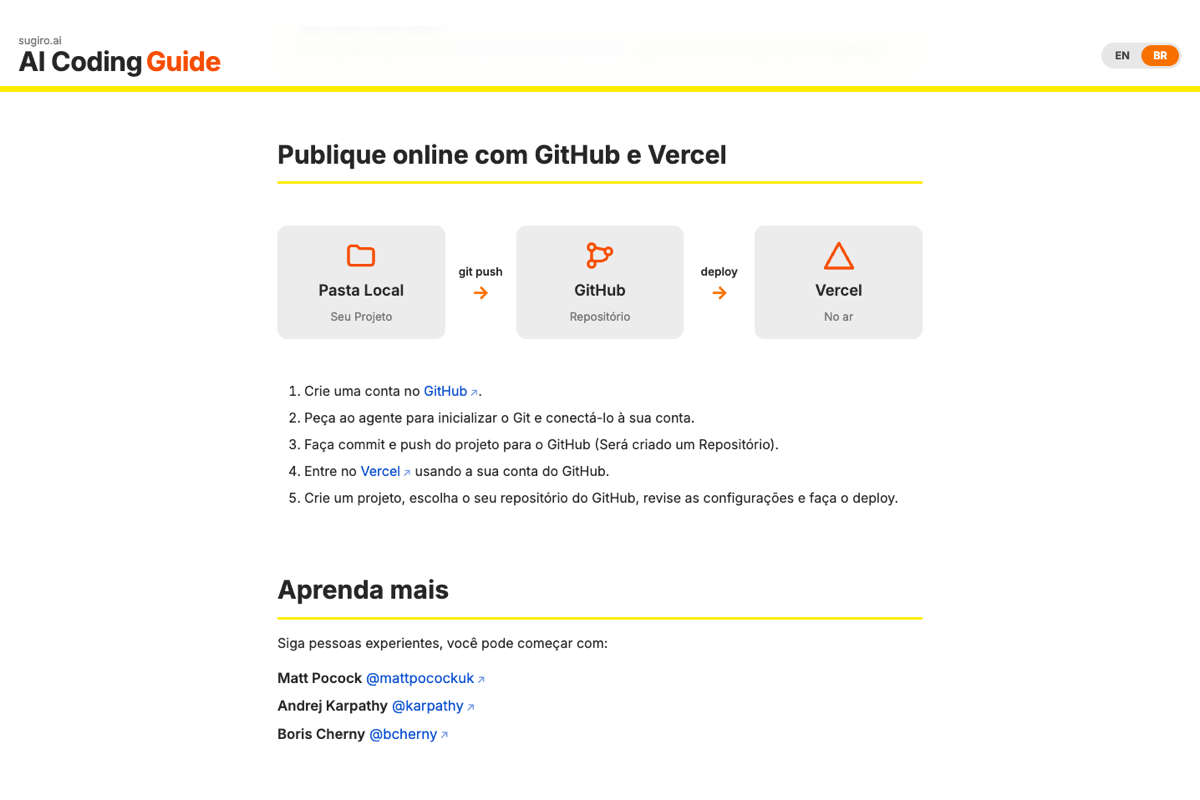
The Publish section includes an inline SVG diagram (Local Folder → GitHub → Vercel) built with plain markup and CSS, not an external diagramming library.
The guide is one static page that greets the reader in Portuguese by default and lets them switch language on the fly.
index.html renders the sticky topbar with the sugiro.ai brand and language switcher, then the four content sections inside main.
A script reads the saved language from localStorage (defaulting to Portuguese) and applies the matching dictionary to every data-i18n element.
The Install section walks through npm install commands for Claude Code and Codex on Mac, Node.js prerequisites, and Windows-specific notes.
The Build Something section suggests a first project and links to the Prompt Builder tool, then the Publish section walks through Git, GitHub, and Vercel deployment with the inline flow diagram.
The Learn More and My Projects sections link out to people to follow, external resources, and the sugiro.ai AI Projects showcase.
This is one of the simplest architectures in the workspace: one HTML file with everything inlined.
index.html
favicon-cg.png
There is no separation between markup, styling, and behavior; the entire guide is intentionally kept in one file for maximum portability.
The page runs entirely in the browser and persists only the reader's language preference; no backend or remote storage is involved.
Install: setup commands and docs links for Claude Code and Codex.
Build Something: a minimal first-project workflow and a link to the Prompt Builder tool.
Publish: a Git, GitHub, and Vercel walkthrough with an inline flow diagram.
Learn More and My Projects: people to follow, external resources, and a link to the sugiro.ai AI Projects showcase.
The chosen language (English or Portuguese) is saved in localStorage and restored on the next visit.
No reader input, form data, or usage analytics are collected.
There is no account system, database, or API calls of any kind.
The guide remains a read-only reference page.
There is no package install or framework workflow here.
open index.html

# or
python -m http.server
You can open the file directly or serve it from a tiny local static server if you prefer local URLs instead of file://.
No npm install step.
No environment variables.
No API keys.
No backend services or external runtime dependencies.
AI Coding Guide is a lightweight bilingual reference page built with plain HTML, CSS, and browser JavaScript, using a custom translation dictionary and an inline flow diagram to document the author's own learning loop with Claude Code and Codex.