Markup
Single HTML entry point
index.html defines the shell, the bilingual copy targets, the form controls, the preview region, and the download button for the generated QR image.
A privacy-first static QR code tool built with plain HTML, a dedicated stylesheet, and browser-side JavaScript. It offers customizable size and color, transparent background, error correction, a dark and light theme, bilingual UI, and client-side PNG export — with no signup, no expiration, no watermarks, and full offline use once the page is loaded.
Live at: https://qrcode.sugiro.ai/
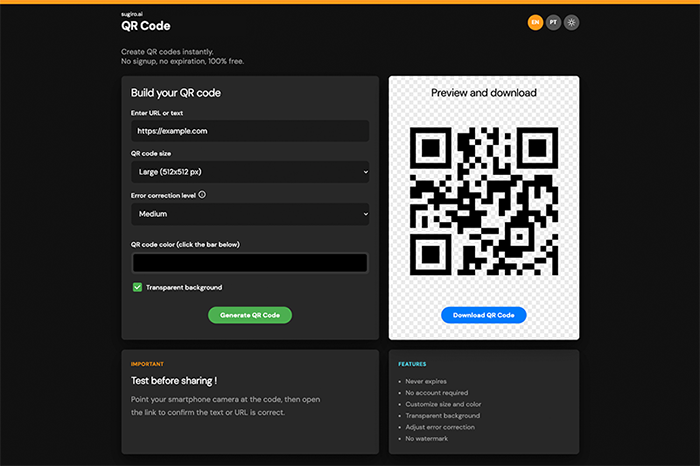
This project is intentionally minimal and browser-native.
index.html defines the shell, the bilingual copy targets, the form controls, the preview region, and the download button for the generated QR image.
The UI styling lives in styles.css, which makes the project more maintainable than an all-inline setup while still keeping the app fully static.
The project ships with a local qr-creator.min.js file instead of depending on a CDN, so QR generation works without network access once the page is loaded.
The user chooses text, size, correction level, color, transparent background, language, and dark or light theme in the browser. JavaScript updates the interface copy and persists locale, theme, and the transparent-background choice in localStorage.
The project has no package manifest, bundler, framework, or API layer. Everything runs as static files in the browser with plain DOM scripting.
The QR code is rendered in-page and can be downloaded as a PNG directly from the browser, with no server-side image generation or upload step.
The app is assembled from one HTML file, one stylesheet, one app script, and one bundled QR library.
index.html wires together the form, preview panel, localized text hooks, and script/style references.
script.js reads the saved language, theme, and transparent-background choice from localStorage, applies the translation copy, and adjusts the color-label wording for desktop versus mobile.
The form controls collect text, size, color, and error-correction settings before generating the code in the page.
qr-creator.min.js exposes the QR generator used by the app script to render the output into the preview area.
The download button reads the rendered canvas or image element and saves the QR code locally without any backend request.
This is still one of the simplest architectures in the workspace, but it is split into clear static assets.
index.html
styles.css
script.js
qr-creator.min.js
The project stays intentionally compact, but it now separates structure, styling, app logic, and the QR dependency into predictable static assets.
The page runs entirely in the browser and persists user preferences locally; no backend or remote storage is involved.
Text or URL input becomes the encoded QR content.
Size, color, error correction, and transparent background are chosen in-page.
Language, theme, and the transparent-background choice are persisted in localStorage so the UI reopens with the same preferences.
No QR content is submitted to a backend or stored remotely.
QR code generation relies on the bundled qr-creator.min.js asset.
The app stays dependency-light and does not need npm or a bundler.
Because the library is local, the tool is more portable than a CDN-based setup.
This remains a lightweight browser utility rather than a larger application stack.
There is no package install or framework workflow here.
open index.html

# or
python -m http.server
You can open the file directly or serve it from a tiny local static server if you prefer local URLs instead of file://.
No npm install step.
No environment variables.
No API keys.
No backend services or external runtime dependencies.
QR Code Generator is a lightweight static utility built with plain HTML, a separate stylesheet, and browser JavaScript, using a bundled QR library plus client-side locale and download logic to keep everything private and server-free.