Framework
Next.js 16 App Router
The app is built with Next.js using the App Router. Page rendering, route handlers, redirects, and server actions all live inside the same framework structure.
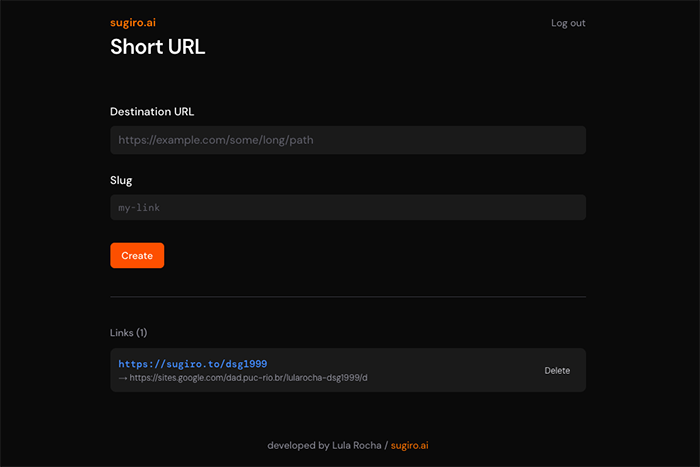
A small full-stack URL shortener built with Next.js App Router. It uses a password-gated admin screen to create and delete links, stores slug records in Redis, falls back to in-memory storage in local development, and resolves public <code>/{slug}</code> requests through a redirect route.
Live at: https://sugiro.to
The core pieces that make the branded short-link workflow work.
The app is built with Next.js using the App Router. Page rendering, route handlers, redirects, and server actions all live inside the same framework structure.
The main interface is a small React-based admin UI for creating and deleting short links. It is intentionally compact and focused on one operational task instead of acting like a broader dashboard.
The interface styling is handled with Tailwind utility classes and shared tokens in app/globals.css. The result is a minimal dark UI with orange accents and lightweight form styling.
Mutations such as login, logout, create, and delete live in app/actions.ts, while the public redirect is handled by a dedicated route file rather than a separate API service.
Link records are stored through the abstraction in lib/redis.ts. In production it connects to Redis through <code>ioredis</code>, and in local development it can fall back to an in-memory Map when <code>REDIS_URL</code> is missing.
Authentication is intentionally simple: a password is checked against ADMIN_TOKEN , then persisted as an HTTP-only cookie using helpers in lib/auth.ts.
The runtime path from opening the admin screen to resolving a short link.
The main page in app/page.tsx calls the auth helper before rendering. Unauthenticated users are redirected to the login page.
The form flows are wired to server actions in app/actions.ts . Those actions validate input, check auth, generate slugs when needed, and trigger cache revalidation for the admin page.
Custom slugs are validated with helpers in lib/slug.ts . If no slug is supplied, the app tries several random base62 candidates until it finds one that is unused.
The Redis layer stores each link record, keeps an index of slugs, and returns the list ordered by creation date. The same interface is also used by the in-memory fallback store for local work without Redis.
Incoming requests to app/[slug]/route.ts look up the slug and issue the redirect. If the slug does not exist, the route returns a 404 response.
The repo is small, but each folder has a very specific role.
app/page.tsx
app/login/page.tsx
app/[slug]/route.ts
app/actions.ts
lib/auth.ts
lib/redis.ts
lib/slug.ts
This app is intentionally narrower than something like Card Tracker. It is not a general CRUD dashboard or a large multi-page product. The core architecture is a small authenticated admin workflow paired with a single public redirect endpoint and a thin storage abstraction.
Persistence is simple and centered on slug records.
Each link record stores the slug, destination URL, and creation time.
Redis keys are namespaced per slug and tracked through a sorted index.
Listing links is based on that index rather than a relational query layer.
There is no database schema, ORM, or migration system in this project.
If REDIS_URL is not configured, the app logs a warning and uses an in-memory Map.
That fallback keeps local setup easy but loses data when the process restarts.
The same store interface is used for both Redis and memory, so the rest of the app stays unchanged.
This makes the project especially lightweight to boot locally.
The interesting part of the app is how admin actions and public redirects share one codebase.
app/page.tsx + app/login/
The admin side uses server-rendered pages with auth checks, simple forms, and server actions for all state changes. There is no separate client API layer for the core workflows.
app/[slug]/route.ts
The public side is a route handler that receives the slug, looks it up in the storage layer, and redirects to the destination URL. That keeps the public behavior extremely small and direct.
The local workflow is intentionally minimal.
npm install
npm run dev

npm run build
npm start
The project uses the standard Next.js cycle: npm run dev for local development and npm run build for production verification.
ADMIN_TOKEN is required for logging into the admin UI.
REDIS_URL is used for Redis-backed persistence in production and can be omitted for local in-memory mode.
Node.js, npm, and the standard Next.js toolchain are enough to run the app.
No external auth provider, ORM, or background job system is required.
Short URL is a small Next.js full-stack utility built around server actions, cookie auth, Redis-backed link storage, and a direct redirect route. Its strength is not complexity but focus: one branded admin workflow, one public slug endpoint, and a very low-friction local setup.