Tech Stack Review

Card Tracker

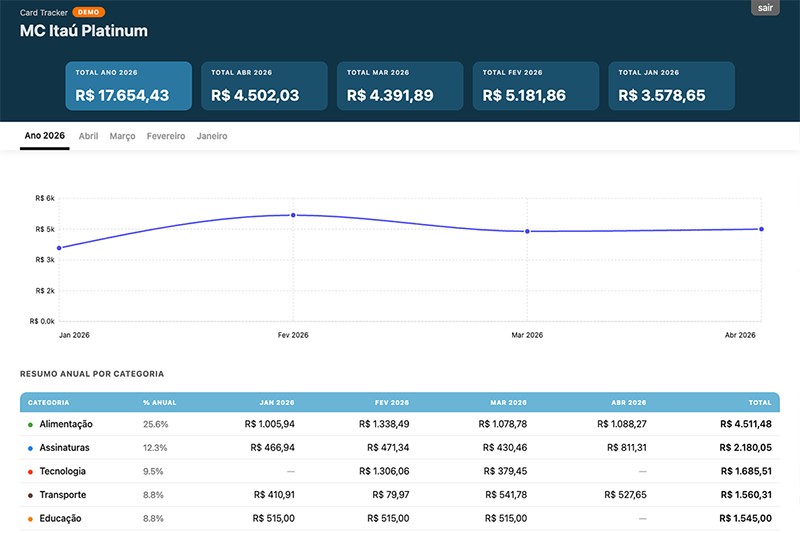
A small full-stack finance dashboard built with Next.js. It reads credit card statements from CSV files, classifies merchants into categories, exposes server-side API routes, and renders charts and tables in a React client.

Main Stack

What is used in this project and what each piece is doing.

Framework

Next.js 15 with App Router

Next.js is the main framework. It handles page routing, server rendering, API endpoints, and the build process. The project uses the app/ directory, which means it is using the newer App Router model instead of the older pages/ router.

UI Layer

React 19

React powers the interactive dashboard. The main dashboard is a client component, so charts, filters, category assignment, local state, and fetch calls all run in the browser after the app loads.

Language

Plain JavaScript

The codebase is written in JavaScript, not TypeScript. There are no type definition files or a TypeScript config, so the project stays lightweight but does not get static type checking.

Charts

Recharts

Recharts is used for the visual reporting layer. It drives the pie charts and line charts in the dashboard and fits naturally into the React component tree.

Persistence

CSV, JSON, and optional Upstash Redis

Transaction data comes from monthly CSV files. Category rules are seeded from JSON files. In local development the app can persist rule changes back to JSON. In deployed environments it can use Upstash Redis for rule persistence.

Runtime

Node.js server runtime

The server-side code uses Node APIs such as node:fs, node:path, and node:crypto. That means this is not just a static site. It needs a Node runtime to read files, process data, and handle authenticated API requests.

How It Runs

The simple runtime story from browser request to rendered dashboard.

1

Next.js starts the app

The project runs with next dev locally and next build plus next start for a production build. The main route lives in app/page.js.

2

Server checks authentication

Before showing the dashboard, the server checks cookies and environment-based passwords in lib/auth.js. If the user is not authenticated, the app renders a password screen instead of the dashboard.

3

Client dashboard fetches data from API routes

Once logged in, the browser-side dashboard component calls /api/months, /api/data/[month], and /api/categories. These route handlers run on the server and return JSON.

4

Server reads CSV and category rules

The server loads statement files from the selected profile's directory, parses the CSV rows, normalizes merchant names, applies categorization rules, and returns shaped transaction data to the client.

5

React renders charts and transaction views

The client component holds the loaded months in local state, computes totals, filters categories, sorts transactions, and feeds the final data into Recharts visualizations and table-like views.

Architecture Map

The project is compact, but it still has a clear split by responsibility.

Key folders
app/Route entry points, layout, global CSS, and API route handlers.
components/React UI components, including the interactive dashboard and password screen.
lib/Core business logic for auth, profiles, CSV parsing, normalization, and rule storage.
statements/Main profile monthly statement CSV files.
statements-demo/Demo dataset used to showcase the app without exposing real data.
Architecture Analysis
package.json
next.config.mjs

app/page.js
app/api/months/route.js
app/api/data/[month]/route.js
app/api/categories/route.js

components/dashboard-client.js

lib/auth.js
lib/profiles.js
lib/statements.js
lib/rules-store.js
lib/normalize.js

This is a very typical small full-stack Next.js shape: routing in app/, UI in components/, and reusable server logic in lib/.

Data and Storage

This app is file-driven first, with Redis as an optional deployment helper.

Primary model

Local files are the main source of truth

Transactions live in monthly CSV files such as 2026-04.csv.

Category rules are stored in JSON files like categories.json.

The server reads these files directly using Node's filesystem APIs.

This makes the project simple to understand and easy to run locally.

Optional cloud layer

Upstash Redis is used only for persisted rules

The project includes @upstash/redis as a dependency.

If Redis credentials exist, saved categorization rules are written to a Redis hash.

If Redis is missing, local development falls back to JSON files.

The statements themselves are still file-based rather than stored in a database.

Auth and Profiles

A lightweight custom authentication system instead of a third-party auth provider.

Authentication

Password gate with cookies

The app hashes a profile-specific password into an HTTP-only cookie. On each request, the server checks whether that cookie matches the configured password stored in environment variables. This is much simpler than OAuth or a full user database and fits a personal tool.

Profiles

Multiple data profiles are built in

lib/profiles.js defines separate profiles for the main account, another account, and a demo mode. Each profile has its own statements directory, categories file, Redis key, and password environment variable.

Run Commands

The practical commands that make the project work.

Scripts from package.json
npm install
npm run dev

npm run build
npm start

The dev script clears the .next directory and starts the local development server. Build and start are the normal production commands for a Next.js app.

Environment setup

What the app expects

DASHBOARD_PASSWORD_[PROFILENAME] for protected profiles.

UPSTASH_REDIS_REST_URL and UPSTASH_REDIS_REST_TOKEN only if Redis-backed persistence is wanted.

Statement CSVs placed in the expected profile directories.

Bottom Line

Card Tracker is a small full-stack Next.js application, not just a frontend website. It uses React for the UI, Node.js on the server, JavaScript instead of TypeScript, CSV and JSON files as its primary data layer, and Upstash Redis only as an optional persistence layer for rules. The architecture is simple and practical: file-based data, custom auth, API routes, and a client dashboard with charts.