Tech Stack Review

BTC Calculator

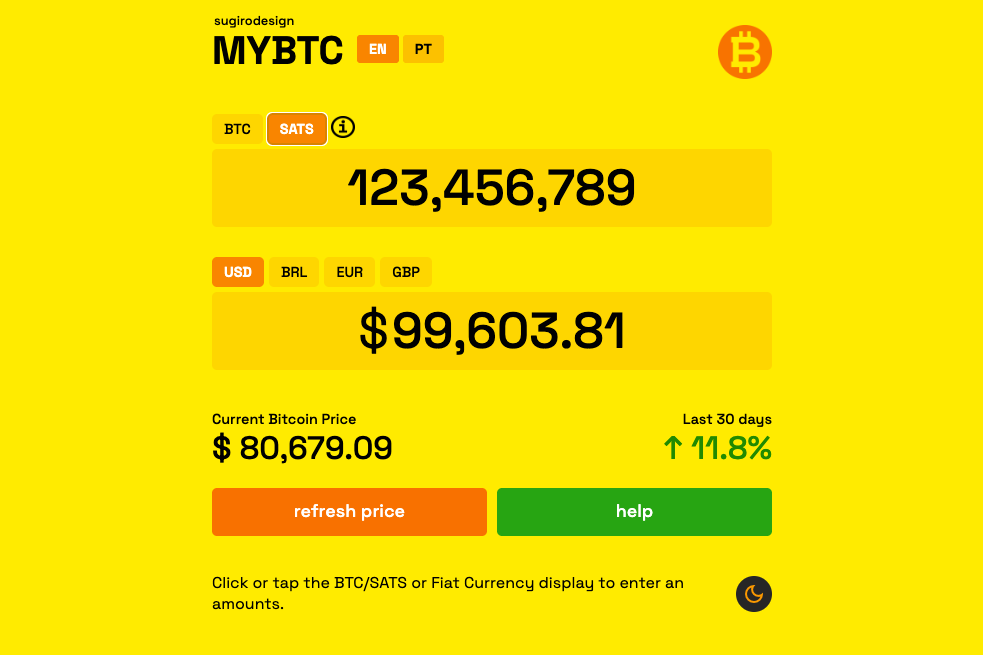
A dependency-light Bitcoin calculator that converts between BTC, SATS, and multiple fiat currencies with live price data. It is built with plain HTML, CSS, and modular JavaScript, including multilingual UI and mobile-specific interaction handling.

Main Stack

What powers this Bitcoin conversion tool and what makes it more feature-rich than a basic static page.

Markup

Plain HTML interface

The UI is defined in one HTML page, including the currency toggles, keypad modal, info panel, help modal, and dynamic display areas for BTC, SATS, and fiat conversions.

Styling

Custom CSS

The visual system is custom-built and includes branded styling, responsive behavior, mobile-first keypad support, icon assets, and dark mode support.

JavaScript structure

Core + app split

The project separates lower-level conversion logic from UI orchestration. That keeps pricing, formatting, translation, interaction, and display logic more maintainable than a one-file script.

Live data

External Bitcoin price API

The app uses live price data for conversions and price-change tracking, so it is still static in structure but depends on an external market data source for full functionality.

User experience

Multi-language and mobile features

The calculator supports English and Portuguese, includes Android-specific handling, a custom keypad flow, dark mode logic, and richer modal/help interactions than a minimal utility page.

BTC amounts are also displayed with thin-space grouping across the eight decimal places (e.g. 1.23 456 789), making sat-level values easier to read at a glance.

Runtime model

No bundler or framework

The project has no package manifest or frontend framework. It stays dependency-light by relying on browser JavaScript, local assets, and a small set of manually organized script files.

How It Runs

The calculator combines static assets with runtime market data inside the browser.

1

The browser loads the static app shell

index.html loads the core interface, icon assets, modal structures, and the JavaScript entry files.

2

Core logic initializes conversion behavior

js/core.js handles currency logic, display formatting, translation data, and calculator behavior shared across the app.

3

App logic wires the UI

js/app.js coordinates animations, info panels, dark mode, Android input handling, and the interactive flow around the displays and modals.

4

Live market data updates the dashboard

The app fetches Bitcoin pricing from an external source and uses it to compute BTC/SATS and fiat equivalents, along with change-period displays.

5

User state stays in the browser

Interactions such as language choice and dark mode preference are handled locally, keeping the app lightweight while still feeling dynamic.

Architecture Map

The project is static, but it is organized more like a small hand-built application than a single-file toy page.

Key files
index.htmlMain UI, modal markup, asset loading, and script entry points.
css/styles.cssAll styling, layout, responsiveness, and visual modes.
js/core.jsCore conversion logic, translation dictionary, and formatting behavior.
js/app.jsUI interaction, modal/panel behavior, dark mode, and mobile-specific logic.
assets/Brand and interface assets like icons and imagery.
archive/Previous or experimental versions kept for reference.
Architecture Analysis
index.html
css/styles.css
js/core.js
js/app.js
assets/
archive/

This is a good example of a project that is still “plain HTML/CSS/JS,” but has enough interaction depth that it behaves like a small product rather than a basic static page.

Data and Storage

The app blends live price data with browser-only preferences and interaction state.

External data

Market pricing comes from an API

The calculator uses live Bitcoin price information rather than only fixed inputs.

Currency conversion depends on that market data being available.

The price view includes change tracking across multiple time windows.

This makes the project more dynamic than an offline-only static calculator.

Local interaction state

Preferences stay in the browser

Language preference is handled locally.

Dark mode state is persisted in localStorage.

Android-specific and keypad behavior are handled client-side.

No account, backend persistence, or database is required.

Run Commands

The app can be opened directly or served with any tiny static server.

Local usage
open index.html

# or
python -m http.server

The README recommends serving it with a small local server, but the project itself has no package install step or build process.

Environment setup

What the project expects

No package manager setup.

No framework runtime.

No environment variables.

Network access is needed for live BTC pricing.

Bottom Line

BTC Calculator is a browser-first static app built with HTML, CSS, and modular vanilla JavaScript, but it goes beyond a simple static utility by incorporating live Bitcoin market data, multilingual UI, dark mode, and mobile-specific interaction handling.