Markup
Plain HTML
The app is a single HTML document that defines the entire interface, including the form, results panels, help button, and modal content. There is no framework or component system involved.
Made specifically for Brazilian taxpayers: it follows Brazilian capital gains tax rules and converts values with BCB PTAX rates.
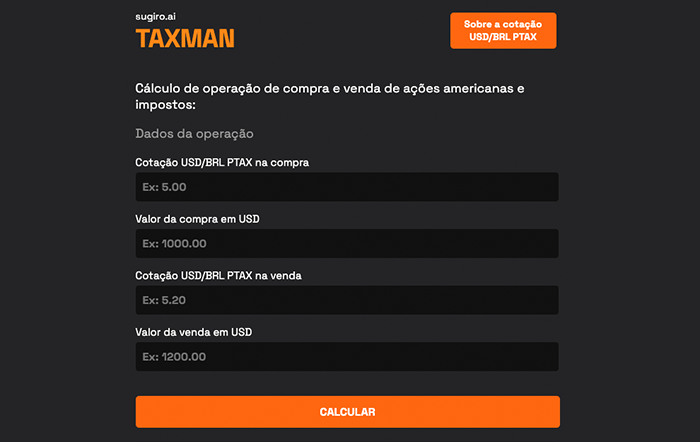
A lightweight browser-based calculator made specifically for Brazilian taxpayers, for simulating tax on capital gains, IOF, gross and net profit on US stock buy/sell operations using PTAX exchange rates. It is built as a plain static web app with HTML, CSS, and vanilla JavaScript.
Live at: https://taxman.sugiro.ai/
What powers this calculator and how lightweight the implementation is.
The app is a single HTML document that defines the entire interface, including the form, results panels, help button, and modal content. There is no framework or component system involved.
The visual design is handled by one standalone stylesheet. The project uses a strong custom look, responsive rules, and imported typography without relying on Tailwind, Bootstrap, or a build pipeline.
The calculator logic runs directly in the browser through plain JavaScript functions. Input validation, calculation, DOM updates, and modal behavior are all implemented without external libraries.
The app is built specifically for Brazilian taxpayers. It converts buy and sell values with PTAX exchange rates and estimates gross profit, tax, IOF, and net values for US stock transactions under Brazilian capital gains rules. It is not applicable to other tax jurisdictions.
The calculator links users to the Central Bank of Brazil PTAX history page and explains which PTAX direction is relevant for buy and sell operations. It does not automate that lookup itself.
This project is fully static. It can be opened directly in a browser or served from any simple static server, which makes it very easy to run and deploy.
The whole app executes client-side inside one browser page.
The interface, labels, input fields, result areas, and modal markup are all embedded directly in index.html.
styles.css provides the entire visual layer, including layout, typography, button styling, modal appearance, and mobile adjustments.
When the user enters PTAX and transaction values and clicks the calculate button, inline JavaScript validates the inputs and computes the currency-converted totals.
The app writes the computed values directly into DOM nodes for acquisition value, sale value, gross profit, taxes, net profit, and percentage analysis.
The explanatory help modal is implemented in the same document and toggled with simple DOM class and display changes rather than a framework component system.
This project is structurally simple: one page, one stylesheet, one inline logic layer.
index.html
styles.css
tax.ico
The whole project is essentially a self-contained browser application. That makes it low-maintenance, but also means structure and scalability are limited compared with component-based apps.
The calculator is input-driven and does not rely on persisted storage or backend services.
The user supplies exchange rates and transaction values manually.
The JavaScript logic validates the fields before any results are shown.
Profit, IOF, and tax calculations are computed immediately in-page.
No data is sent to a backend or saved to a database.
The rules modelled are the Brazilian ones, so the results only make sense for Brazilian taxpayers.
The interface links out to BCB PTAX historical data.
The modal explains why different PTAX sides matter for buy and sell operations.
The calculator is framed as a simulation aid rather than an authoritative tax engine.
The page explicitly advises consulting a specialized accountant.
No framework dev server is required unless you want one.
open index.html

# or
python -m http.server
You can open the file directly in a browser or serve it with any very small static server if you prefer a local URL-based workflow.
No package manager or dependency installation step.
No environment variables.
No API keys.
No backend runtime.
Capital Gains Calculator is a plain static web app built with HTML, CSS, and vanilla JavaScript. Its strength is simplicity: everything runs in the browser, there is no build step, and the domain logic is focused tightly on one financial/tax calculation workflow, aimed specifically at Brazilian taxpayers reporting gains on US stock trades.